MonoVertex
A MonoVertex is the simplest way to run Numaflow. It is a single vertex that reads from a Source, optionally transforms or maps the data, and writes to a Sink. Because there is only one vertex and no edges, a MonoVertex needs no Inter-Step Buffer Service.
This page builds up in two steps:
- A simple MonoVertex - a built-in source and sink, no custom code.
- A MonoVertex with your own code - a user-defined source, transformer, map, and sink.
This page assumes you have already completed Prerequisites & Installation.
A Simple MonoVertex
We start with the smallest possible MonoVertex: a built-in generator source that produces messages, wired directly to a built-in log sink that prints them. No custom containers are involved.
Deploy the MonoVertex
kubectl apply -f https://raw.githubusercontent.com/numaproj/numaflow/main/examples/20-simple-mono-vertex-builtin.yaml
Verify the Deployment
List the deployed MonoVertices:
kubectl get monovertex # or "mvtx" as a short name
You should see an output similar to this:
NAME                         PHASE     DESIRED   CURRENT   READY   AGE   REASON   MESSAGE
simple-mono-vertex-builtin   Running   1         1         1       38s
Inspect the status by listing the pods. Note that the pod names in your environment may differ from the example below:
# Wait for pods to be ready
kubectl get pods

NAME                                                READY   STATUS    RESTARTS   AGE
simple-mono-vertex-builtin-mv-0-w7fmq               1/1     Running   0          2m30s
simple-mono-vertex-builtin-mv-daemon-55bff65db5-x   1/1     Running   0          2m30s
View the Logs
The log sink runs inside the MonoVertex pod's numa container. Follow its logs. Replace xxxxx with the appropriate pod name from the output above:
kubectl logs -f simple-mono-vertex-builtin-mv-0-xxxxx -c numa
You should see the generated messages being printed:
2025/05/09 11:23:38 (sink)  Payload -  {"value":1746789818182898304}  Keys -  [key-0-0]  EventTime -  1746789818182  Headers -    ID -  0-0
2025/05/09 11:23:38 (sink)  Payload -  {"value":1746789818182898304}  Keys -  [key-0-0]  EventTime -  1746789818182  Headers -    ID -  1-0
Access the Numaflow UI
Numaflow includes a built-in user interface for monitoring your workloads. If your local Kubernetes cluster does not include a metrics server by default (e.g., Kind), install it using the following commands:
kubectl apply -f https://github.com/kubernetes-sigs/metrics-server/releases/latest/download/components.yaml
kubectl patch -n kube-system deployment metrics-server --type=json -p '[{"op":"add","path":"/spec/template/spec/containers/0/args/-","value":"--kubelet-insecure-tls"}]'
To access the UI, port-forward the Numaflow server:
kubectl -n numaflow-system port-forward deployment/numaflow-server 8443:8443
Visit https://localhost:8443/ to view the UI.
Note: For more details about the UI features and built-in debugging tools, check out the UI section.
Delete the MonoVertex
kubectl delete -f https://raw.githubusercontent.com/numaproj/numaflow/main/examples/20-simple-mono-vertex-builtin.yaml
A MonoVertex with Your Own Code
The built-in source and sink are handy for a first run, but real workloads usually read from your own systems and run your own logic. This next example uses:
- a User-Defined Source (UDSource),
- an optional Transformer,
- a Map UDF that runs your own processing logic, and
- a User-Defined Sink (UDSink) with a Fallback Sink.
A sink can also declare an OnSuccess Sink to route successfully-processed messages to a second destination (for example, an audit or acknowledgement stream). It is optional and not part of this example; for a complete MonoVertex that wires up a fallback sink, an onSuccess sink, and message routing together, see the 23-mono-vertex-bypass.yaml example.
Each of these is just a container image. In this example the map step uses a pre-built map-cat image (it forwards each message unchanged); to run your own logic you swap in your own image built with one of the Numaflow SDKs.
Deploy the MonoVertex
kubectl apply -f https://raw.githubusercontent.com/numaproj/numaflow/main/examples/21-simple-mono-vertex.yaml
Verify the Deployment
kubectl get monovertex # or "mvtx" as a short name
You should see an output similar to this:
NAME                 PHASE     DESIRED   CURRENT   READY   AGE   REASON   MESSAGE
simple-mono-vertex   Running   1         1         1       38s
Inspect the status by listing the pods. Replace xxxxx with the appropriate pod name from your environment:
# Wait for pods to be ready
kubectl get pods

NAME                                           READY   STATUS    RESTARTS   AGE
simple-mono-vertex-mv-0-w7fmq                  6/6     Running   0          2m30s
simple-mono-vertex-mv-daemon-55bff65db5-mk4g2  1/1     Running   0          2m30s
View Pod Details
Each user-defined container runs as its own container in the pod. To confirm all containers (udsource, transformer, udf, udsink, fb-udsink, and numa) are running, describe the pod:
kubectl describe pod simple-mono-vertex-mv-0-xxxxx
Monitor Logs for the Sink Container
To view logs from the udsink container, run the following. Replace xxxxx with the appropriate pod name:
kubectl logs -f simple-mono-vertex-mv-0-xxxxx -c udsink
Because the map only echoes the messages, the output looks the same as the source data:
2025/05/09 11:23:38 (sink)  Payload -  {"value":1746789818182898304}  Keys -  [key-0-0]  EventTime -  1746789818182  Headers -    ID -  0-0
2025/05/09 11:23:38 (sink)  Payload -  {"value":1746789818182898304}  Keys -  [key-0-0]  EventTime -  1746789818182  Headers -    ID -  1-0
Access the Numaflow UI
If you have not already, port-forward the Numaflow server:
kubectl -n numaflow-system port-forward deployment/numaflow-server 8443:8443
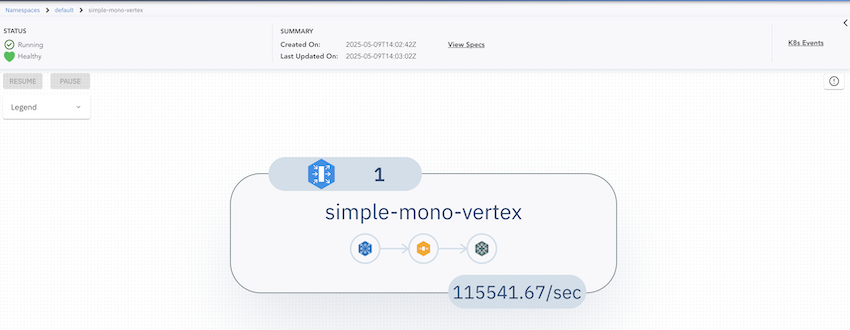
Visit https://localhost:8443/ to view the UI. Below is an example of the UI for this MonoVertex:
Delete the MonoVertex
kubectl delete -f https://raw.githubusercontent.com/numaproj/numaflow/main/examples/21-simple-mono-vertex.yaml
Additional Notes
The source code for the user-defined containers used in this MonoVertex is available here:
To write your own, start with the SDKs overview.
Next Step
A MonoVertex is ideal when you read from a source, optionally transform, and write to a sink. When you need multiple processing stages, branching, joins, or windowed aggregation, you need a full pipeline. Continue to the Pipeline guide.