Pipeline
A Pipeline connects multiple vertices with edges. Unlike a MonoVertex, a pipeline can have many processing stages, branch data to different destinations, join streams, and run windowed aggregation (reduce). Vertices exchange data through an Inter-Step Buffer Service (isbsvc).
This page builds up in two steps:
- A simple pipeline - a source, a processing vertex, and a sink connected by edges.
- An advanced pipeline - conditional forwarding to multiple sinks.
This page assumes you have already completed Prerequisites & Installation. The containers you learned about in the MonoVertex guide - sources, sinks, transformers, and map UDFs - work exactly the same way here.
Deploy the Inter-Step Buffer Service
Pipelines pass data between vertices through an Inter-Step Buffer Service. A MonoVertex does not need one, which is why we skipped it earlier; a pipeline does. Deploy the JetStream-based ISB Service before creating a pipeline:
kubectl apply -f https://raw.githubusercontent.com/numaproj/numaflow/main/examples/0-isbsvc-jetstream.yaml
You only need to do this once per namespace. All pipelines in the namespace share it.
A Simple Pipeline
In this section, we create a simple-pipeline with three vertices: a source vertex to generate messages, a processing vertex that echoes the messages, and a sink vertex to log them. The edges connect them in order: in -> cat -> out.
Deploy the Simple Pipeline
kubectl apply -f https://raw.githubusercontent.com/numaproj/numaflow/main/examples/1-simple-pipeline.yaml
Verify the Pipeline Deployment
To view the list of pipelines you have created, use the following command:
kubectl get pipeline # or "pl" as a short name
You should see an output similar to this, where AGE indicates the time elapsed since the pipeline was created:
NAME              PHASE     VERTICES   AGE   MESSAGE
simple-pipeline   Running   3          47s
Next, inspect the status of the pipeline by checking the pods. Note that the pod names in your environment may differ from the example below:
# Wait for pods to be ready
kubectl get pods

NAME                                         READY   STATUS      RESTARTS       AGE
isbsvc-default-js-0                          3/3     Running        0           4m9s
isbsvc-default-js-1                          3/3     Running        0           4m9s
isbsvc-default-js-2                          3/3     Running        0           4m9s
simple-pipeline-cat-0-xjqbe                  3/3     Running        0           99s
simple-pipeline-daemon-784d5cfd97-vpsmk      1/1     Running        0           99s
simple-pipeline-in-0-vvhu1                   2/2     Running        0           100s
simple-pipeline-out-0-y1z8e                  2/2     Running        0           99s
Notice the isbsvc-default-js-* pods: those are the Inter-Step Buffer Service that carries data between the vertices.
View Logs for the Output Vertex
To monitor the logs for the out vertex, run the following command. Replace xxxxx with the appropriate pod name from the output above:
kubectl logs -f simple-pipeline-out-0-xxxxx
You should see logs similar to the following:
2025/05/09 11:23:38 (out)  Payload -  {"Data":{"value":1746789818182898304},"Createdts":1746789818182898304}  Keys -  [key-0-0]  EventTime -  1746789818182  Headers -    ID -  cat-1526-0-0
2025/05/09 11:23:38 (out)  Payload -  {"Data":{"value":1746789818182898304},"Createdts":1746789818182898304}  Keys -  [key-0-0]  EventTime -  1746789818182  Headers -    ID -  cat-1529-0-0
2025/05/09 11:23:38 (out)  Payload -  {"Data":{"value":1746789818182898304},"Createdts":1746789818182898304}  Keys -  [key-0-0]  EventTime -  1746789818182  Headers -    ID -  cat-1528-0-0
Access the Numaflow UI
Numaflow includes a built-in user interface for monitoring pipelines. If your local Kubernetes cluster does not include a metrics server by default (e.g., Kind), install it using the following commands:
kubectl apply -f https://github.com/kubernetes-sigs/metrics-server/releases/latest/download/components.yaml
kubectl patch -n kube-system deployment metrics-server --type=json -p '[{"op":"add","path":"/spec/template/spec/containers/0/args/-","value":"--kubelet-insecure-tls"}]'
To access the UI, port-forward the Numaflow server:
kubectl -n numaflow-system port-forward deployment/numaflow-server 8443:8443
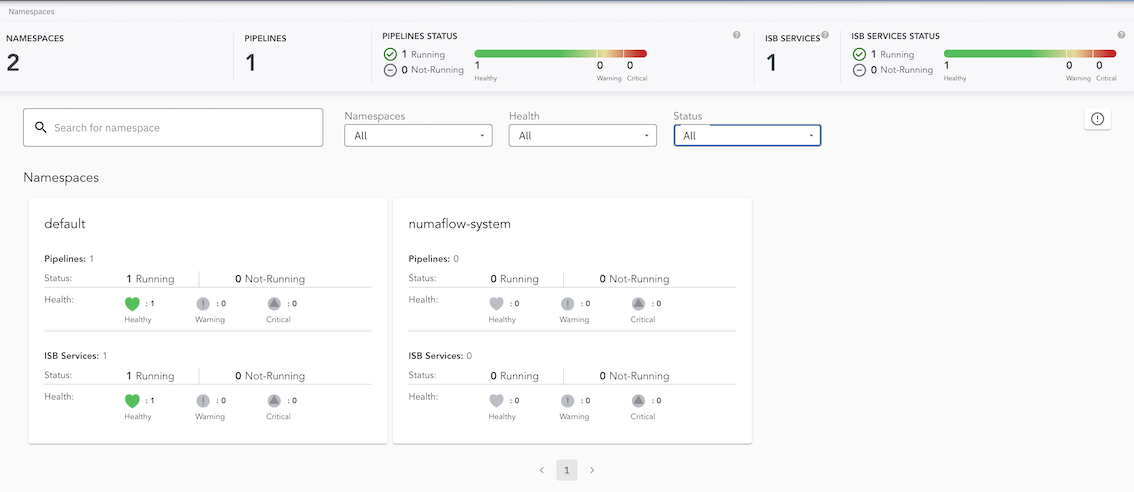
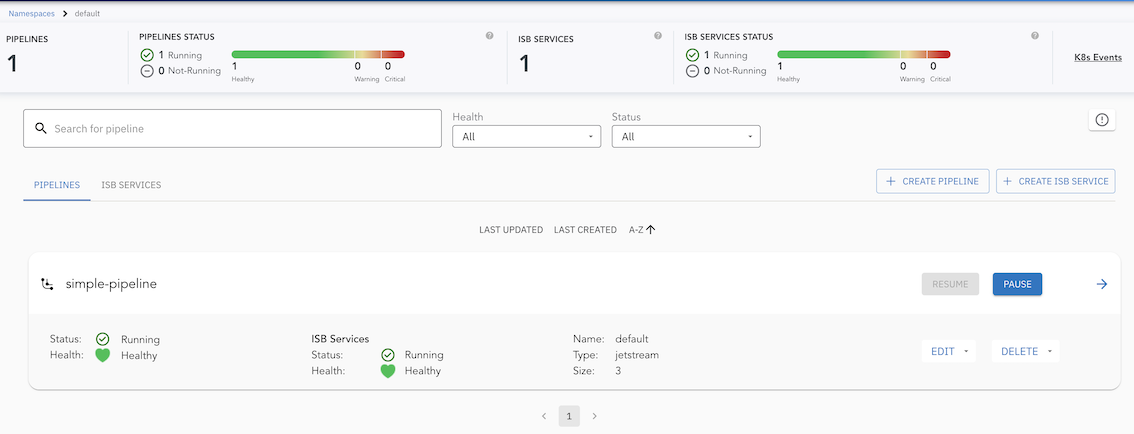
Visit https://localhost:8443/ to view the UI. Below is the UI for the simple-pipeline:
Cluster View
Default Namespace View
Simple Pipeline View
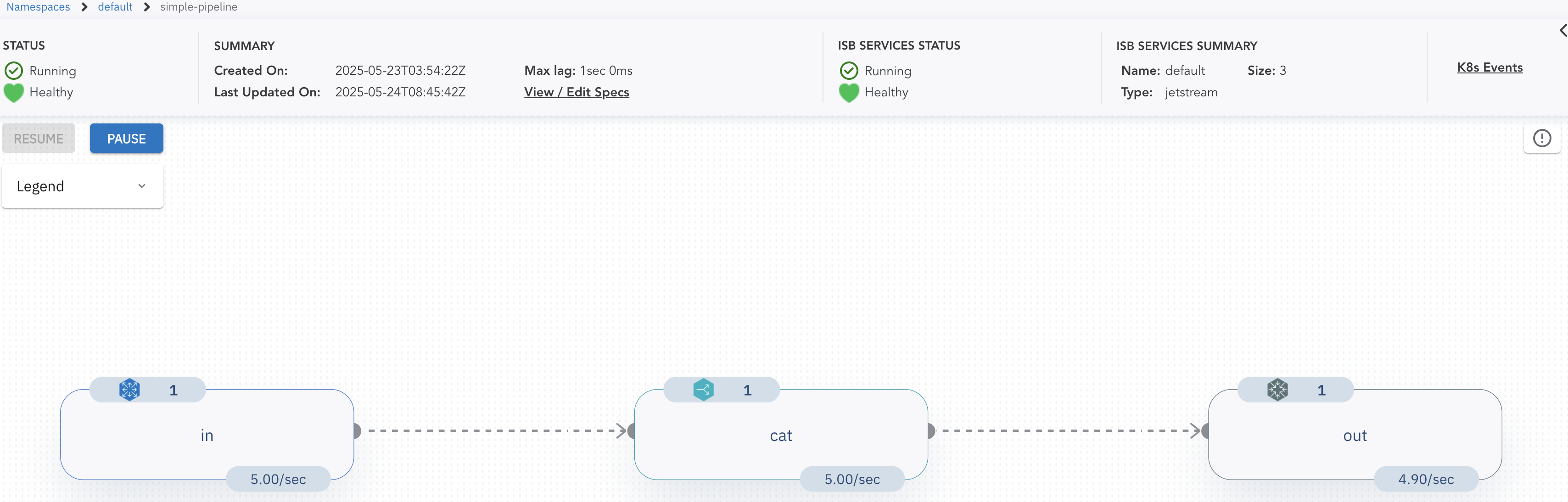
Note: For more details about the UI features and built-in debugging tools, check out the UI section.
Delete the Pipeline
kubectl delete -f https://raw.githubusercontent.com/numaproj/numaflow/main/examples/1-simple-pipeline.yaml
An Advanced Pipeline
Now we walk through a more capable pipeline. Our example is called even-odd, illustrated by the following diagram:
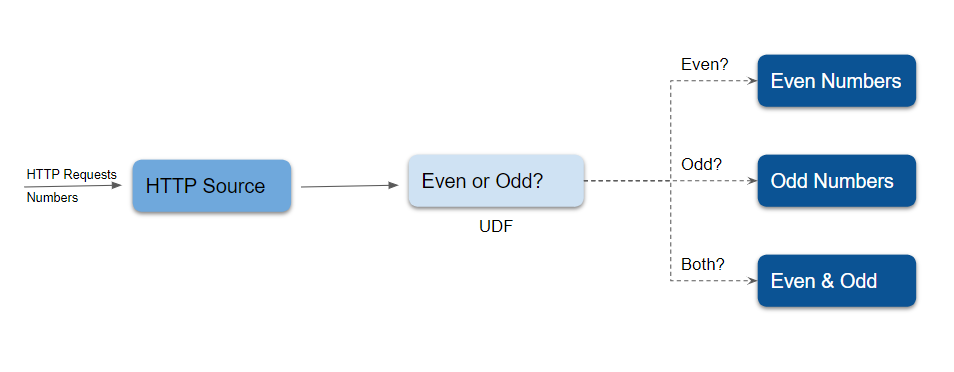
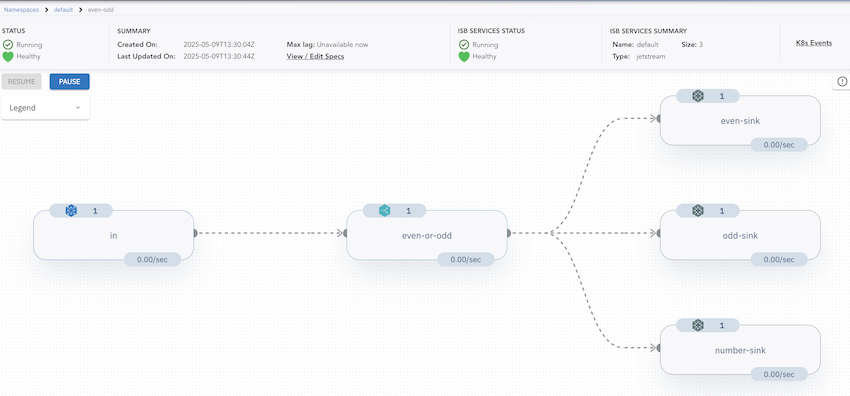
There are five vertices in this example. An HTTP source vertex serves an HTTP endpoint to receive numbers as source data, a UDF vertex tags the ingested numbers with the key even or odd, and three Log sinks print the even numbers, the odd numbers, and both, respectively. This shows conditional forwarding: the same UDF output is routed to different sinks based on the message key.
Deploy the even-odd Pipeline
kubectl apply -f https://raw.githubusercontent.com/numaproj/numaflow/main/examples/2-even-odd-pipeline.yaml
You can check the list of pipelines you have created so far using:
kubectl get pipeline # or "pl" as a short name
NAME       PHASE     VERTICES   AGE   MESSAGE
even-odd   Running   5          51s
Otherwise, proceed to inspect the status of the pipeline by checking the pods:
# Wait for pods to be ready
kubectl get pods

NAME                               READY   STATUS    RESTARTS   AGE
even-odd-daemon-75cdcd5f4c-nmrrp   1/1     Running   0          95s
even-odd-even-or-odd-0-i72hw       3/3     Running   0          95s
even-odd-even-sink-0-gnhou         2/2     Running   0          95s
even-odd-in-0-tvfef                2/2     Running   0          95s
even-odd-number-sink-0-3s3nc       2/2     Running   0          95s
even-odd-odd-sink-0-zktib          2/2     Running   0          95s
isbsvc-default-js-0                3/3     Running   0          15m
isbsvc-default-js-1                3/3     Running   0          15m
isbsvc-default-js-2                3/3     Running   0          15m
Send Data to the Pipeline
Port-forward the HTTP endpoint of the source vertex and send data using curl. Replace xxxxx with the appropriate pod name:
kubectl port-forward even-odd-in-0-xxxxx 8444:8443

# Send data to the HTTP endpoint
curl -kq -X POST -d "101" https://localhost:8444/vertices/in
curl -kq -X POST -d "102" https://localhost:8444/vertices/in
curl -kq -X POST -d "103" https://localhost:8444/vertices/in
curl -kq -X POST -d "104" https://localhost:8444/vertices/in
View Logs for the even and odd Vertices
Monitor the logs for the even and odd sinks to verify the pipeline's functionality. Replace xxxxx with the appropriate pod names:
# Logs for the even sink
kubectl logs -f even-odd-even-sink-0-xxxxx

2025/05/09 13:34:26 (even-sink)  Payload -  104  Keys -  [even]  EventTime -  1746797665477  Headers -  Content-Length: 3, Content-Type: application/x-www-form-urlencoded, User-Agent: curl/8.7.1, Accept: */*,   ID -  even-or-odd-1-0-0
2025/05/09 13:34:26 (even-sink)  Payload -  102  Keys -  [even]  EventTime -  1746797665430  Headers -  Content-Type: application/x-www-form-urlencoded, User-Agent: curl/8.7.1, Accept: */*, Content-Length: 3,   ID -  even-or-odd-2-0-0

# Logs for the odd sink
kubectl logs -f even-odd-odd-sink-0-xxxxx

2025/05/09 13:34:26 (odd-sink)  Payload -  101  Keys -  [odd]  EventTime -  1746797665407  Headers -  Content-Length: 3, Content-Type: application/x-www-form-urlencoded, User-Agent: curl/8.7.1, Accept: */*,   ID -  even-or-odd-4-0-0
2025/05/09 13:34:26 (odd-sink)  Payload -  103  Keys -  [odd]  EventTime -  1746797665452  Headers -  Content-Length: 3, Content-Type: application/x-www-form-urlencoded, User-Agent: curl/8.7.1, Accept: */*,   ID -  even-or-odd-3-0-0
Access the Numaflow UI
To visualize the pipeline, access the Numaflow UI at https://localhost:8443/ after port forwarding. Below is the UI for the even-odd pipeline:
Delete the Pipeline
kubectl delete -f https://raw.githubusercontent.com/numaproj/numaflow/main/examples/2-even-odd-pipeline.yaml
Additional Notes
The source code for the even-odd user-defined function is available here. You can also replace the Log Sink with other sinks, such as Kafka, to forward data to Kafka topics.
Going Further: Reduce (Aggregation)
Windowed aggregation - grouping messages over time and reducing them - is a pipeline-only feature. It requires the full pipeline because data must be shuffled across keys, which a single-vertex MonoVertex cannot do. To set up an example pipeline with the Reduce UDF, see Reduce Examples.
Next Step
You have now run both a MonoVertex and a pipeline. Continue to What's Next to explore more sources, sinks, and user-defined functions.